Showing posts with label digital caricature. Show all posts

Thursday, November 26, 2015

A Boy Who Loves Chuggington!


Choo Choooooooo!

Wow! This Boy will celebrate his 4th Birthday with some noise from the Chuggington railway tracks!

It was fun creating this piece.

Thank you so much for your order :).

Have Fun.


Monday, March 17, 2014

Cool Caricature Cupcake Topper & Another Cutesy Pie

Awwww... 
my client has sent me a couple of pics that turned my caricature into a cupcake topper!
How awesome is that?


Thanks a lot, dear.

Another thanks is for sharing my art to your kind friend who then requested me to draw a digital caricature of her baby with some favorite cartoon characters!

What a cutesy little pie this child is :).

Enjoy!

Thursday, February 27, 2014

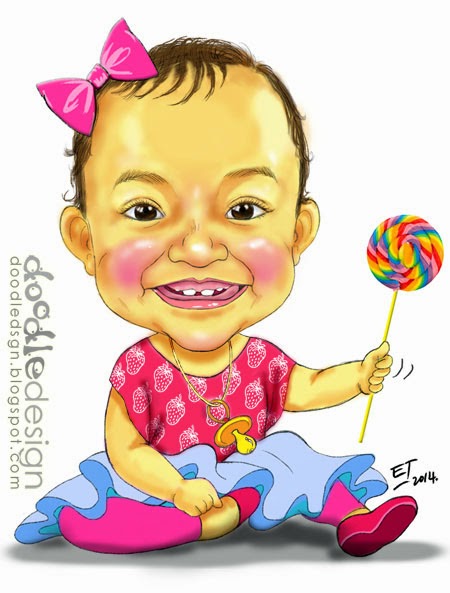
This Cute Girl Again :)


Another request from her Mom with White background.
I just love drawing her happy bright face...not forgetting those two front teeth!

Previous drawing of little Azalea:


Monday, September 30, 2013

Cik Siti is Getting Married

In June, she was engaged... and there was a caricature and a bunting to go with the event which was made by me. You can see it HERE.

This month, the moment has almost arrived for her to experience and embrace the moment when the 'title' Miss will turn into Mrs!

My lovely Cik Siti made a last minute request to have a different Caricature for her Big Day. This time, she wanted the faces to look a bit more 'real'.

So, here it is...


Alongside with that, I have also designed her a couple of buntings and a photo booth backdrop.


Her request: A Sweet Looking bunting with Real Photos.

A Photo Booth backdrop complete with their common field/ interest = Construction!

So...last but not least, Barakallah ya Siti...
Hope everything will go on smoothly as planned for your wedding day, insyaAllah...
May Allah bless you and your family, always.

Thank you for ordering 
and
 Enjoy!

Monday, March 4, 2013

Save d' Date for her Weddin'!

Now that almost everyone that we know is on the net, we could always send a friendly reminder in a digital form. 

So why not send a virtual "Save The Date'' for an important occasion such as a Wedding?

Here's one I made for a sweet client, recently...


By the way, this bride-to-be is such a good blogger-baker! (Hmmm.. her hubby-to-be is so lucky, huh?)

So, please take a peek at her hot stove, dapurCikWan for some great recipes!!!

Enjoy...

Monday, January 21, 2013

Black & White... and A Freebie


This black & white wedding couple caricature was on A4 paper and I used pencil & pen (for the outline). 


This one, on the other hand... was a digital sketch using my bamboo pen.


Now, here's the Freebie I made just for fun.
It started as a small doodle in the sketch book and she's just so sweet smiling little thing that I wanted to share with you :).

Enjoy!


Thursday, June 21, 2012

Lurvely Header & A Teacher

My blogger friend asked me to do a few things for her lovely blog:
- a sweet new header
- a business card design
- and a watermark
All of these required some hand drawn works that came from her own ideas!

Check out her creative outlet at lurvering.blogspot.com.


Another client, a tuition center's teacher... wanted to have herself drawn as a cartoon to be printed on t-shirts for a program she organized. Another cool idea, huh?


Enjoy!


Tuesday, April 3, 2012

The BBQ Man & How I Made it!


A thoughtful client of mine has commissioned a colored Digital Caricature for a buddy of his. 

Now, how about I share with you the STEPS taken to create this one?

Some might wonder how a digital caricature is made. Every artists/ caricaturists may have different ways to create hers/ his and  may even used different software. 

I approach my Digital Caricature almost the same as the conventional way (paper/ pencil/pen). The difference was that I will be using Photoshop and a pen tablet (wacom bamboo).

STEP 1:


- Open Photoshop
- Open the Picture for reference

STEP 2:


- Open a New Window for your digital drawing
- In this case, I have created a Blank, White, A4 Sized window. So... it's like I'll be drawing on a piece of A4 "digital" paper.

STEP 3:


- Now you can start your rough sketch of the Caricature in one Layer.
- When you make your rough sketch, you can adjust anything at all using the tools in Photoshop. Thus, it's crucial that you're familiar with the software first... this requires some practice... maybe trial and error too.

STEP 4:


- After the rough sketch, create another Layer ABOVE it and make a proper drawing of the face using neater strokes and lines.
- If you see closely, I have lowered the Opacity of the rough sketch's Layer to 60% or less... This will help me draw better.

STEP 5:


- Then, continue to draw the body and the rest of what you've planned in your initial rough sketch.

STEP 6:


- After you're done with the proper drawing,"'switch off" the eye of the rough Layer. 
- You can now start Coloring your Caricature.
- Create a NEW Layer UNDER the Drawing- that's how I did it. This will be the Layer you use to color your Digital Caricature.
- Not necessarily only one layer for coloring the whole thing. You can create as many layers as you like for different parts of the Caricature. For example, one layer for the skin, one layer for the attire, one layer for the cap and one layer for the BBQ thingy...

STEP 7:


- There you are... it's done now!
- Well, actually I took some time to color the Caricature too. I feel that I also need more practice to improve my style of coloring using Photoshop's brushes. There are so many techniques of blending colors and such in Photoshop that we could explore as we do more digital coloring, of course!


Already then, Have Fun with Art :)

Sunday, March 4, 2012

2 Digital Caricatures!

Here are a couple of 'free' Digital Caricatures I made for my GA#3 winners!

This one is for Ildi Cukipok from Romania!!! And she has also received the small package of gifts I sent   last few weeks. Glad to know you & make your day, Ildi :D!


And this one was made for Ani Haryati who sent a 'vintage' pic of herself & hubby in 1996 for me to turn into a Caricature. Hihiii... so sweet :)


Enjoy!

Wednesday, February 15, 2012

Digital Caricature


The caricature above was totally done in Photoshop, using my pen tablet of Wacom Bamboo Fun. Now that I've got the hang of it, I could enjoy doodling more and more (paperless- save the environment!). It's also to easier for me to email to anyone, anywhere in the world... without having to scan and edit- really a time (and postage) saver!

But sometimes, I still need to use the conventional ways to make my Art. Nothing beats the feeling of touching the good old drawing papers and keeping them in hard copies for years to come.

Whatever medium I choose to create my Art, it's the process that I enjoy the most. 

To see something that comes out from 'nothing'... To create those variation of lines and colors and watch them forming some wonderful images... To appreciate what God has given me that could give joy to myself and others. Well, in a way... even though I don't really make much, I'm just happy to be an Artist :).

If anyone is interested to order a Digital Caricature from me, please drop a note to doodledsgn@gmail.com. When the caricature done, I'll email it in jpeg- high enough resolution picture file so that you can print at the comfort of your home or any nearby printing shop :). 

Enjoy!


Related Posts Plugin for WordPress, Blogger...